
Tiny Desk AI: How to Make the Outstanding Video
One guide for the whole meme: where it came from, the top-tier model and fixed template behind it, the four shots and five seats, and the photo choices that decide whether it looks right.
Published 14 min read
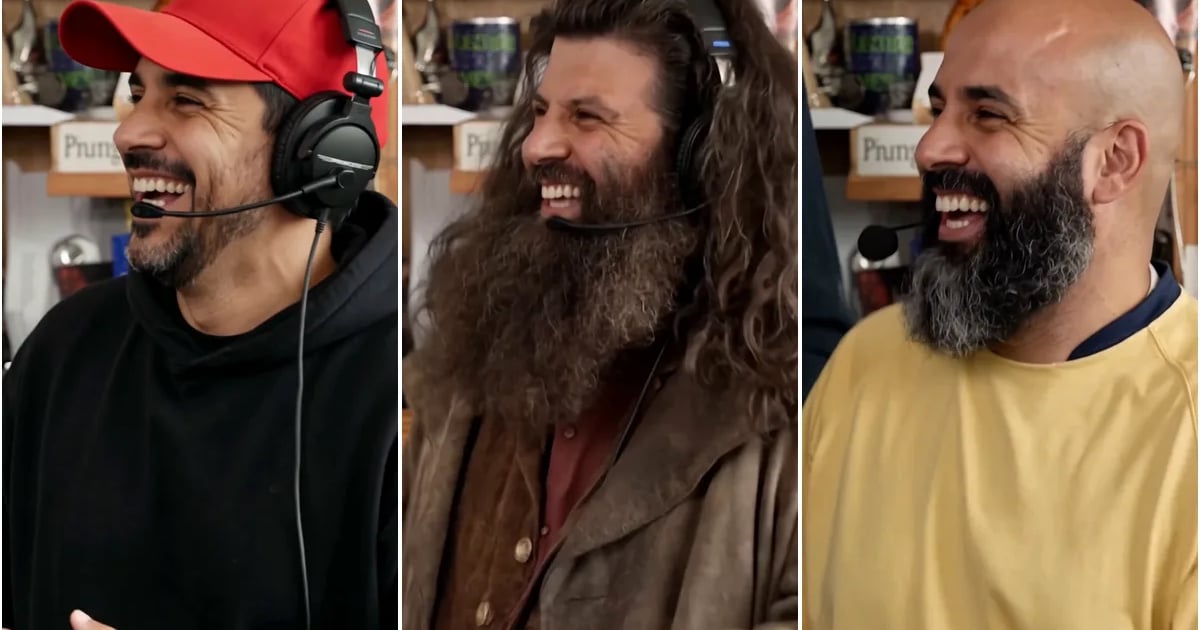
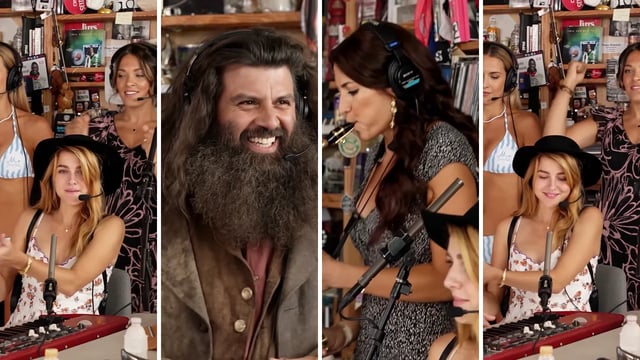
The Outstanding Tiny Desk AI trend turns a photo into a desk-concert performance: a band behind a desk, a lead singer who turns to camera with a laugh and a wave, a sax solo, and a closing fist in the air. It looks like a dance or a lip-sync. It is not. It is a casting joke — the performance never changes, only the people in it.
This guide covers the whole format in order: what the meme is and why it spread, the model and fixed template behind it, the four shots and five seats that make up the template, and the photo decisions that separate a version that lands from one that looks wrong.
What the Outstanding Tiny Desk AI meme is
The source is a 2023 NPR Tiny Desk concert by Charlie Wilson, performing “Outstanding” — a Gap Band song he originally sang lead on. The section that gets remade is short: the band behind the desk, the lead singer turning to the camera with a laugh and a wave, a sax solo, and a final shot with a fist in the air.
Everything around that section is fixed. The room, the lighting, the cuts, the timing and the music stay exactly as they are; only the performers are replaced. A viewer who knows the clip recognises the version before the second shot, which is why the edit can be rough and the joke still lands.
The other thing worth knowing up front: no version of this is a real Tiny Desk performance. If you post one, label it as AI-generated where the platform asks, and do not present it as footage of the actual concert.
Where it came from and why it spread
The version that lit the fuse cast college football coaches whose teams had just lost. The song's refrain — “outstanding” — lands as sarcasm when the person singing it has just been beaten by a rival, and the format moved across TikTok and X within days. From there it expanded to teammates, coworkers, politicians and family groups, and the structure stayed identical, because the joke is the casting, not the editing.
Most AI video formats ask the viewer to admire the generation. This one asks them to read a cast, and that is a much lower bar.
- A recognisable source. People already know the clip, so one glance explains what changed and why it is funny.
- A punchline built into the footage. The lead singer's turn to camera is already a beat; you only have to put the right face on it.
- Five seats, not one. A group can be cast in a single video, which makes the meme something a group chat does together rather than a solo edit.
- No prompt. The format is fixed, so even the lowest-effort version still reads as the trend.
- A short loop. About eighteen seconds is long enough to set up a joke and short enough to watch twice.
The model behind the template: Kling 4.0
A fixed template solves the staging, but it does not solve identity. Carrying one photo through four shots while keeping the lighting, hair and clothing of the scene intact is the hard part, and it is done by the video model, not by the template.
We run that edit on Kling 4.0, the newest and most capable model in that family — not an older or cut-down version we could have run more cheaply. A top-tier model costs more per render than the ones behind most bargain template tools, and that is the main reason a single video here is 520 credits rather than a token amount. There is no subscription, and credits are refunded automatically if a generation fails. What the 520 credits buy is the same face surviving all four shots at full fidelity — the thing cheaper models tend to lose first.
The template, shot by shot
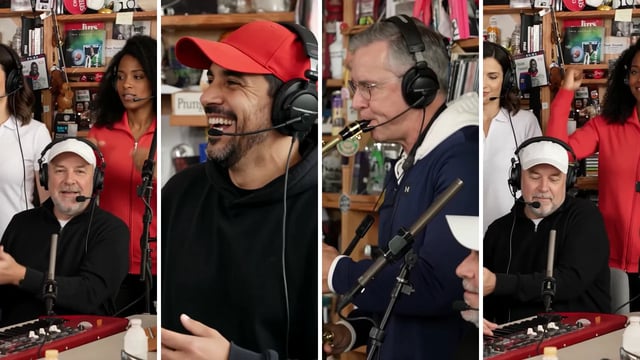
A template here does not mean a CapCut project you open and cut yourself. It means a finished performance the model edits in place: a fixed sequence of four shots, roughly eighteen seconds long, with the timing and the soundtrack already correct. You do not describe a scene, choose a camera move or supply a reference video. You assign photos to seats, and the model recasts the performers inside footage that never changes.
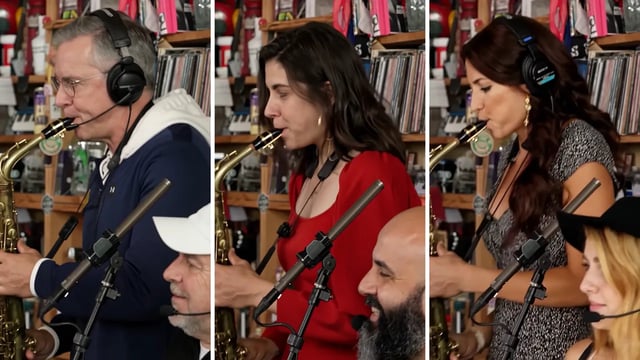
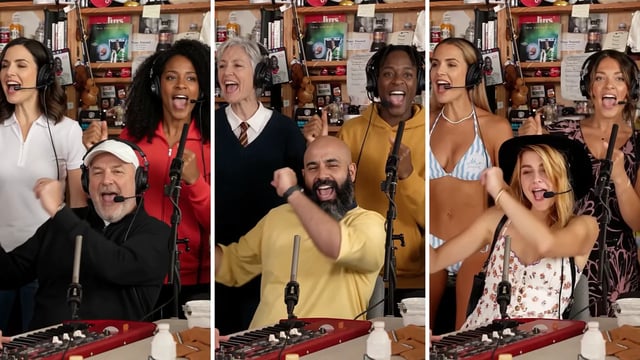
Shot one, about five seconds, belongs to the keyboard player and the two backup singers. Shot two is the moment the meme is built around: a close-up of the lead singer laughing and waving, roughly six seconds. Shot three is the sax solo, filmed from the side with the keyboard player in the corner. Shot four returns to the trio, with a fist in the air.
The order tells you which seats matter. The lead singer gets the longest shot and the punchline. The keyboard player appears in three of the four. The backup singers open and close the clip. The sax player appears once, but it is the most recognisable moment after the laugh.
There are five fixed seats, and only the lead singer is required — every empty seat keeps the band's own musician, so a single photo still produces a full band.
- Lead singer — required. The close-up and the closing trio. This is the shot people screenshot.
- Keyboard player — three of the four shots, including the opening and the sax solo. The most consistently visible optional seat.
- Backup singers, left and right — the opening and closing group shots. Good seats for people who want to be in the video without carrying it.
- Sax player — the solo only. One shot, but the most recognisable one after the laugh.
Step 1: pick the photo that does most of the work
Most disappointing results are photo problems, not model problems. The model replaces the whole person — face, hair, skin tone, build and outfit — and it only knows what your photo shows it. A photo that hides half of that leaves the model guessing, and guessing is what produces a face that drifts between shots.
Technically, the model is matching edges: the line of the jaw, the hair against the background, the shape of the shoulders, the colour and cut of the clothing. It rebuilds the person from those edges and repeats the reconstruction across four shots under different lighting and camera angles. That is why clarity beats resolution — a sharp 1,200-pixel phone photo gives clean edges, while a soft 4,000-pixel photo full of compression artefacts gives noise. It is also why a front-on photo matters: the template's camera is straight on, so a three-quarter photo forces the model to invent the missing side of the face.
The short answer: one person, looking at the camera, sharp and evenly lit, waist up so the outfit is visible. No sunglasses, no hands in front of the face, no heavy beauty filter, no steep angle, and a separate photo per person rather than a group shot.
- Do use daylight or soft, even indoor light. Hard side light splits the face into two exposures.
- Do show the outfit from the shoulders down. The model takes clothing from the photo, not from the template.
- Do keep the camera at eye level. Photos from below widen the jaw; photos from above shrink it.
- Do not use sunglasses, masks or hands near the face.
- Do not use beauty filters or heavy HDR. The smoothing becomes the person's skin.
- Do not use a screenshot of a video call. It is usually soft, off-centre and lit from the screen.
- Do not use a group photo for several seats. Crop one person at a time, or ask for separate photos.
Step 2: cast the five seats
The seats are not equally demanding, so put your best photo where it will be seen most. The lead singer is the strictest seat: a six-second close-up, straight on, sharp, no sunglasses. The sax seat is optional but gets one of the closest frames in the clip, so a sharp photo pays off there too. The keyboard player is visible in three shots, mostly mid-frame. The backup singers appear in the opening and closing group shots, where faces are smaller — the most forgiving pair of seats.
Where you put a person also decides how the joke lands. Give the lead seat to whoever the joke is about: the birthday person, the boss, the friend who lost the bet, the manager whose team just shipped. Put the people who want to be in the video without carrying it on backup. Casting is the fun part, and it is also the only creative decision the format asks you to make.
If you are casting a group, the practical difficulty is not the generator — it is collecting five usable photos without turning it into a project. Send one message with the rules rather than five messages with corrections. Something like: “Send me a photo of just you, looking at the camera, from the waist up, in daylight. No sunglasses, no filters. I am putting you in a band.” Most people will send a selfie taken from slightly below, because that is the photo everyone has. It usually still works; it just distorts the jaw and hides the outfit.
A few casts that tend to work: the group chat, everyone in the band and the lead seat to whoever talks the most; the team that just shipped; the birthday, with the birthday person on lead and friends on backup; the farewell, a leaving colleague on lead; the family, grandparents on the close-up and grandchildren on the group shots. The common thread is that the lead seat should be someone the audience recognises — the joke is the casting, so the more people who get it instantly, the better the clip performs.
Step 3: generate, and know what to do when it fails
Press Generate. The video is queued, edited on a GPU and stitched back together with the template's soundtrack, which is why it takes minutes rather than seconds. You can close the tab: the job waits in your history, and the card shows how long it has been running. A five-person video takes about as long as a one-person video, because the whole clip is edited in one pass regardless of how many seats are filled.
Each video costs 520 credits. Free credits on new accounts are sized for the image tools, not for video: an eighteen-second frame-by-frame edit costs far more to render than a single image. Credit packs are one-time purchases with no subscription, and the credits do not expire.
If a job fails, the 520 credits are returned automatically and the history card tells you why. Retry with the same photos before changing anything else — most failures are queue or safety-check issues, not photo issues, and swapping out a good photo after a failed job makes the next result harder to judge.
Step 4: post it without borrowing someone else's footage
The result is a vertical MP4, 720 × 1280, with sound, ready for TikTok, Instagram Reels or YouTube Shorts. Download it from the history card and post it as you would any other clip.
If you want the trend sound people associate with the meme, add “Outstanding” from TikTok's or Instagram's licensed music library when you upload, then turn the original soundtrack down. The video's own soundtrack stays useful when you post somewhere without that library, or when you want the band to sound like a band.
The rules that keep the format fun are simple. Use photos of people who agreed to be in the clip, including anyone under 18, who needs a parent's consent. Label the video as AI-generated where the platform asks, and do not present it as a real Tiny Desk performance. Do not upload public figures or anyone who would object, and do not use the result in advertising or anything commercial without permission.
One more distinction worth keeping straight: a template-based video avoids the recording, it does not avoid the trademark. Tiny Desk is an NPR trademark and “Outstanding” belongs to its rights holders, so keep the framing clearly fan-made.
The mistakes that make a result look wrong
Almost every disappointing result traces back to the photo, not the model. These are the ones that come up most often, roughly in order.
- Using a group photo for several seats. Each person gets a fraction of the pixels and the outfit is usually cut off. Crop one person at a time, or ask for separate photos.
- Sunglasses, hands or hair across the face. The model has less face to match, and the result drifts between shots.
- A heavy beauty filter. The filter's smoothing becomes the person's skin in the video, which looks wrong next to the unedited band.
- A photo taken from below or from the side. The template's camera is straight on; a three-quarter photo produces a three-quarter face in a front-on shot.
- Changing several things at once after a bad result. Change the photo first, then the seat, then the settings — otherwise you cannot tell which change helped.
If you use a different tool, check these six things
Almost every “best Tiny Desk AI” list mixes products that do different things, so it helps to know what you are comparing before you read the ranking. Six questions separate a tool you can use once from one you can recommend to a group chat.
- Does it use the original broadcast or its own template? The answer decides your rights exposure, not just your quality.
- How many people can it cast? One seat is a filter; five seats is a group activity.
- Is the output watermark-free, and what resolution and duration do you actually get?
- What happens when a render fails — are credits returned automatically?
- Can you download the MP4, or are you limited to a share link that expires?
- Does it say what it does with your photos, and how long it keeps them?
Frequently asked questions
What is the Outstanding Tiny Desk AI trend?
It is a meme format that recreates the closing section of Charlie Wilson's 2023 Tiny Desk performance of “Outstanding” with new people in the band. The performance stays the same and the cast changes, which is what makes the joke work.
How do I make a Tiny Desk AI video?
Pick a clear, front-on photo for each person you want in the band, drop each one into a seat — lead singer, sax, keyboard, two backup singers — and press Generate. The clip is ready in a few minutes. Empty seats keep the template's own musicians, so a single photo is enough to start.
Do I need to write a prompt?
No. The template already contains the performance: the band, the shots, the timing and the music. You assign photos to seats and press Generate. There is no prompt box because there is nothing to describe.
Can I make a video with one photo?
Yes. The lead singer seat is the only required one. Upload one photo, leave the other four seats empty, and the band's own musicians keep their places while you take the microphone.
What is the best photo to upload?
One person, looking at the camera, sharp and evenly lit, waist up so the outfit is visible. Daylight, no sunglasses, no beauty filter, camera at eye level. A separate photo per person beats a group shot, and clarity matters more than resolution.
Can I use a pet in the band?
Yes — a dog on sax or a cat on backup vocals is one of the most shared versions of the meme. Use a front-on photo with the eyes, nose and ears visible, ideally against a plain background. Results vary more with animals than with people.
Who should be the lead singer?
Whoever the joke is about: the birthday person, the boss, the friend who lost a bet. The lead seat gets the longest close-up and the laugh, so it carries the clip and deserves the sharpest photo.
How much does a video cost?
520 credits per video, refunded automatically if the generation fails. Free credits on new accounts are sized for the image tools. Credit packs are one-time purchases, no subscription, and credits do not expire.
Is it affiliated with NPR or Charlie Wilson?
No. Tiny Desk is an NPR trademark and the song belongs to its rights holders. This tool is independent and uses its own band template, with no NPR footage or recording in the output. Keep any video you post clearly fan-made.
Which version looks most consistent?
A template-based one, because the whole clip is edited in one pass with the same photos. Prompt-driven video models regenerate each shot, which is where faces drift; face swaps depend on borrowing the original footage.
The format is four decisions: which photo, which seats, when to press Generate, and where to post. Everything else is the template doing its job.
If the first result is close but not right, change the photo before you change anything else. Clarity and a straight-on angle fix more results than any setting — and in a group video, that one fix is usually the only one you need.