
What is BigXthaPlug Give It All AI?
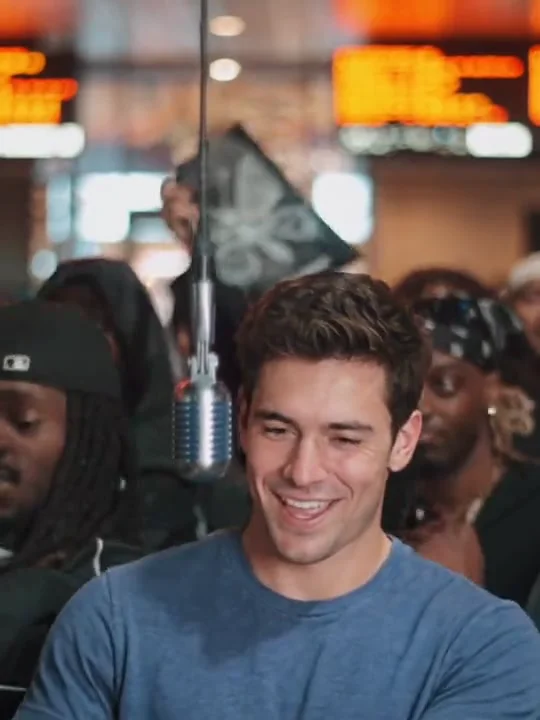
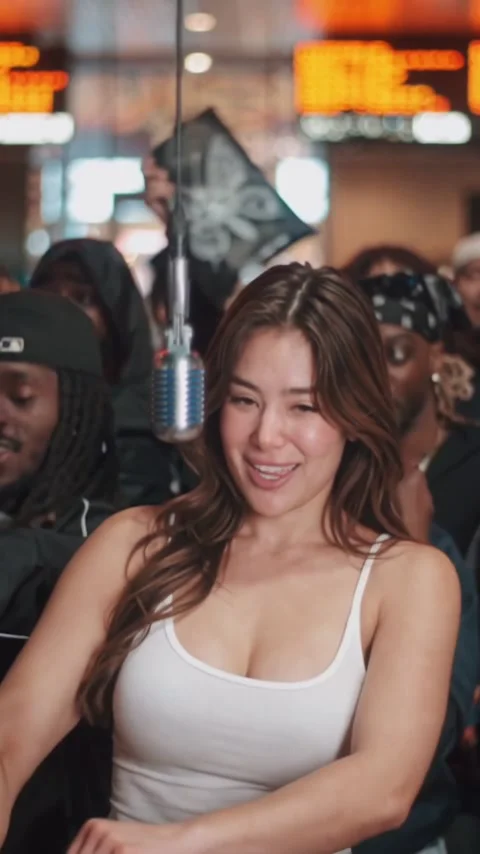
BigXthaPlug Give It All AI puts you at the hanging mic of the Give It All trend: a vintage microphone on a long cable, a packed cinema lobby behind it and orange signs overhead. You add one photo, and the performer in the template becomes you.
Many posts call the same idea the Give It All to Me AI trend. The moves, the three camera angles and the cuts stay as they are in the template; your face, hair, build and outfit come from your photo. It works like an AI rap video generator with the scene already built: there is no prompt to write.
Can a friend be in it with me?
Not in this one. The template has a single rapper, so it takes one photo and leaves the crowd as it is.
Is it BigXthaPlug’s voice?
The clip’s sound is rebuilt from the template by the video model. It is not a recording made by or with the artist.
Do I have to learn the gestures?
No. The lean into the mic, the arms and the open hands at the end come from the template.
Where the trend comes from
GIVE IT ALL is a BigXthaPlug track from the album BETTER OVER TIME, and it entered Shazam’s global chart in November 2026. The AI version borrows the look of a hanging-mic performance: one rapper, one vintage microphone and a crowd pressed in behind.
How to make a BigXthaPlug Give It All AI video
- 1Add one photo
Upload a clear photo of one person facing the camera. Waist-up works best, because two of the three shots are close.
- 2Pick a resolution
Choose 480p, 720p or 1080p. The model, length and format are already set by the template.
- 3Generate and download
Press Generate and watch the progress in My creations. When it is ready, download the MP4 with sound.
What your BigXthaPlug Give It All AI video shows
The lobby
A crowded cinema lobby at night, with orange signs above and people waving a black flag.
The mic
A vintage silver microphone on a long cable, hanging at mouth height in every shot.
The cuts
Three angles: close from the front, from the side under neon, then a wider front shot.
You
The only rapper in the clip, in your own clothes, from the first frame to the last.
What happens in BigXthaPlug Give It All AI
| 0–4 s | Close on you beside the mic. You look down, laugh and look back up while the crowd behind you waves a black flag. |
|---|---|
| 4–6 s | You lean in, start rapping and bring a hand up to your face. |
| 6–8 s | Cut to a side angle under orange neon: you reach both arms out toward the mic. |
| 8–12 s | Still on the side angle, you turn to the camera and rap with your hands working in front of you. |
| 12–15 s | Cut to a wider front shot: you stand in the middle of the crowd and open both hands at the end. |
BigXthaPlug Give It All AI at a glance
| Your photos | 1 photo |
|---|---|
| Length | 15s |
| Format | 9:16 · MP4 |
| Model | Wan 3.0 |
| Kept from your photos | Faces, hair, builds and outfits |
| From the template | The lobby, the hanging mic, the crowd, three angles and every gesture |
| Sound | On; the model rebuilds it from the template’s soundtrack |
| Our example | Made at 480p on Wan 3.0 on 23 November 2026, in about 5 minutes |
| Price | 480p: 300 credits · 720p: 525 credits · 1080p: 975 credits |
BigXthaPlug Give It All AI, a CapCut template or filming it
| This page | A CapCut template | Filming it yourself | |
|---|---|---|---|
| Where | In the browser, on a phone or computer | In the CapCut app | On location, with a camera |
| People | One, from a photo | Set by the template | You, a mic and a crowd |
| What you get | 15 s, 9:16, with sound, as an MP4 | The template’s own cut and sound | Your own shots and edit |
| The moves | Taken from the template | Depends on the template | You learn and perform them |
| Cost | Credits, shown before you generate | Set by CapCut | Your time |
Tips for BigXthaPlug Give It All AI
- Use a photo with one person only. The template has a single performer and keeps the crowd as it is.
- Face the camera in even light, with nothing covering your face: the mic already hides part of it in some frames.
- Wear what you want to rap in. The outfit comes from your photo, and the last shot shows you down to the waist and below.
- Want two or three people in one clip? Try Stormzy Shut Up AI or Wassup in a Minute AI.
BigXthaPlug Give It All AI FAQ
What is the BigXthaPlug Give It All AI trend?
A short-video trend that puts a new face at the hanging mic of BigXthaPlug’s Give It All performance, with the crowd behind and the song on.
Is the Give It All to Me AI trend the same thing?
Yes. People use both names for the same hanging-mic clip.
How many photos do I need?
One photo of one person. The performer in every shot is replaced by that person.
How much does BigXthaPlug Give It All AI cost?
Each resolution has a fixed price in credits, shown in the table above and on the Generate button before you submit. A failed generation returns its credits.
Does the video have sound?
Yes. The model rebuilds the soundtrack from the original clip, so small differences are possible.
Whose photos can I use?
Your own, or photos of people who agreed to be in the video. Do not use strangers, public figures or children, and label the clip as AI-generated where a platform asks.
Is BigXthaPlug Give It All AI official?
No. This is an independent template. It is not affiliated with or endorsed by BigXthaPlug, his label, From The Block or TikTok.
Which site makes the BigXthaPlug Give It All AI video from photos?
This page does. Add the photos, choose a resolution and press Generate; the MP4 appears in My creations. Nothing to install.
Is there a free version?
No. Every video costs credits, sold in one-time packs on the pricing page. A failed generation gives its credits back.
How long does it take?
Usually several minutes, longer at higher resolutions. You can leave the page; the video waits in My creations.
Or start from your own video
BigXthaPlug Give It All AI keeps its own scene and moves. If you have another clip in mind, start from your own video: upload it, add photos and describe the change with our video to video AI.