
What is Street Dance AI?
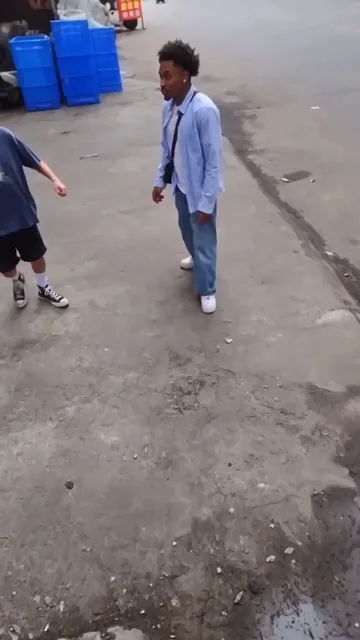
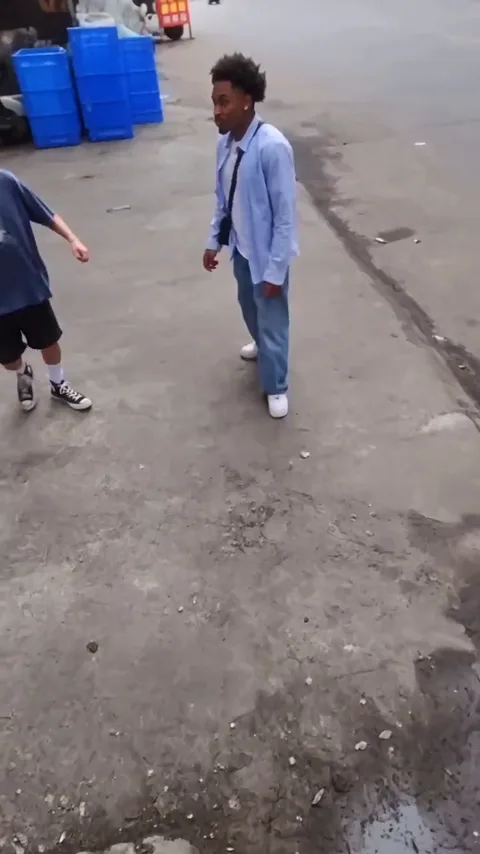
Street Dance AI turns two photos into a street dance clip for two: you and a friend take turns dancing right up to a handheld camera in a narrow city street.
You add one photo each. The moves, the street and the camera work come from the template; your faces, hair, builds and outfits come from your photos. The person filming stays out of shot except for a hand that reaches in now and then, just like in the original.
Who dances first?
The left photo starts on the left and opens the routine; the right photo starts on the right and closes it with the final close-up.
Whose hand is in the video?
The hand of the person filming. It stays from the template and is not replaced.
Can it be two friends, a couple or siblings?
Any two people who agreed to be in it.
Where the trend comes from
Street dance clips filmed with the camera in hand are a popular short-video format: two dancers take turns rushing the lens in an ordinary street while the person filming moves with them. This template is one of those clips, and your two photos replace the two dancers.
How to make a Street Dance AI video
- 1Add two photos
One photo per person: the left photo starts on the left, the right photo on the right.
- 2Pick a resolution
Choose 480p, 720p or 1080p. The model, length and format are already set by the template.
- 3Generate and download
Press Generate, follow the progress in My creations and download the vertical MP4 with sound.
What your Street Dance AI video shows
The street
A narrow city street with parked motorbikes, blue crates and wet pavement.
The two of you
Head to toe, taking turns at the camera, in the clothes from your photos.
The moves
Kicks, grooves and quick steps right up to the lens.
The camera
Handheld and first-person, swinging between the two of you.
What happens in Street Dance AI
| 0–2 s | Both of you in the street; the left dancer kicks out while the right one watches. |
|---|---|
| 2–4 s | You take turns stepping up, and the left dancer leans right into the lens. |
| 4–6 s | The right dancer grooves forward until the camera holder’s hand reaches out. |
| 6–8 s | The camera swings round, you both run back, and the left dancer comes in again with a kick. |
| 8–10 s | The left dancer drops low and grooves in front of the lens while the right one waits behind. |
| 10–12 s | The right dancer charges in for the closing close-up, one arm up past the camera. |
Street Dance AI at a glance
| Your photos | 2 photos |
|---|---|
| Length | 12s |
| Format | 9:16 · MP4 |
| Model | Wan 3.0 |
| Kept from your photos | Faces, hair, builds and outfits |
| From the template | The street, the handheld camera and the moves |
| Sound | On; the model rebuilds it from the template’s soundtrack |
| Our examples | The original clip, and the same dance with two fashion dolls |
| Price | 480p: 240 credits · 720p: 420 credits · 1080p: 780 credits |
Street Dance AI, a CapCut template or filming it
| This page | A CapCut template | Filming it yourself | |
|---|---|---|---|
| Where | In the browser, on a phone or computer | In the CapCut app | On location, with a camera |
| People | Two, one photo each | Set by the template | Two people who know the steps |
| What you get | 12 s, 9:16, with sound, as an MP4 | The template’s own cut and sound | Your own shots and edit |
| The moves | Taken from the template | Depends on the template | You learn and perform them |
| Cost | Credits, shown before you generate | Set by CapCut | Your time |
Tips for Street Dance AI
- Full-body photos work best: the camera shows you from head to toe before each close-up.
- A clear front view of each face helps, because the close-ups fill the frame.
- Use one person per photo, in good light, facing the camera.
- Want a festive version? Try Christmas Sweater Dance AI. Three of you? Try Wassup in a Minute AI.
Street Dance AI FAQ
What is Street Dance AI?
A template that puts two people into a street dance clip filmed handheld: they take turns dancing up to the camera in a city street, in one take.
Can I do it alone?
No. This template has two dancers and needs two photos.
Do the photos need to be taken outside?
No. Any clear photo works; the street comes from the template.
How much does Street Dance AI cost?
Each resolution has a fixed price in credits, shown in the table above and on the Generate button before you submit. A failed generation returns its credits.
Does the video have sound?
Yes. The model rebuilds the soundtrack from the original clip, so small differences are possible.
Whose photos can I use?
Your own, or photos of people who agreed to be in the video. Do not use strangers, public figures or children, and label the clip as AI-generated where a platform asks.
Is Street Dance AI official?
No. This is an independent template. It is not affiliated with or endorsed by TikTok, the original dancers or the owners of the music.
Is there a free version?
No. Every video costs credits, sold in one-time packs on the pricing page. A failed generation gives its credits back.
How long does it take?
Usually several minutes, longer at higher resolutions. You can leave the page; the video waits in My creations.
Or start from your own video
Street Dance AI keeps its own scene and moves. If you have another clip in mind, start from your own video: upload it, add photos and describe the change with our video to video AI.