
What is Costume Dance AI?
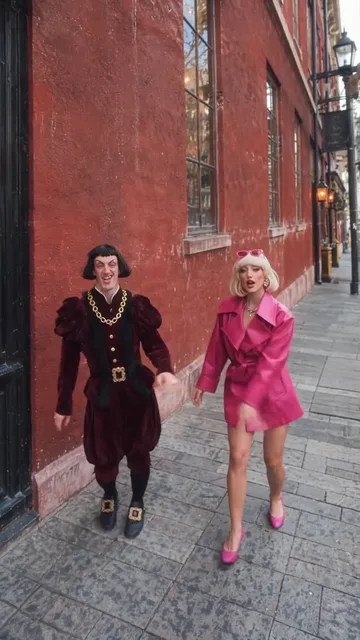
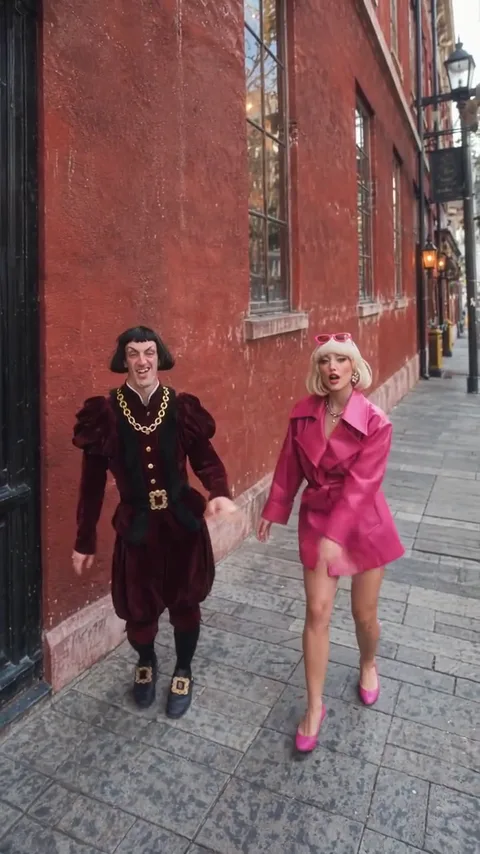
Costume Dance AI turns two photos into a dressed-up duo dance on a brick street: one of you in a velvet prince outfit with a black bob wig and a gold chain, the other in a pink coat with a blonde bob.
You add one photo each. Your faces and builds come from your photos; the costumes, wigs and shoes stay from the template, along with the moves and the camera that pulls back from a close-up.
Do we keep our own clothes?
No. In this template the costumes and wigs stay; your faces and builds come from your photos.
Who wears which costume?
The left photo gets the velvet prince outfit, the right photo the pink coat.
Can it be a couple, friends or siblings?
Any two people who agreed to be in it.
Where the trend comes from
Costume duo dances are a short-video favourite: two people in over-the-top outfits, a straight face and a simple routine on the street. This template is one of those clips, with your faces in the costumes.
How to make a Costume Dance AI video
- 1Add two photos
One photo per person: the left photo starts on the left, the right photo on the right.
- 2Pick a resolution
Choose 480p, 720p or 1080p. The model, length and format are already set by the template.
- 3Generate and download
Press Generate, follow the progress in My creations and download the vertical MP4 with sound.
What your Costume Dance AI video shows
The street
A cobbled street along a red brick wall with old lamps.
The costumes
A velvet prince outfit with a gold chain, and a pink belted coat with pink heels.
The dance
A strut, shoulder bounces, small kicks and arm moves, side by side.
The camera
Starts on a close-up and pulls back to show you both head to toe.
What happens in Costume Dance AI
| 0–1 s | A close-up: you both lean into the camera, one of you with a peace sign. |
|---|---|
| 1–3 s | The camera pulls back and you strut down the brick street side by side. |
| 3–6 s | Shoulder bounces and small kicks in step. |
| 6–9 s | Arm moves and hip sways, still side by side. |
| 9–11 s | A last pose to the camera. |
Costume Dance AI at a glance
| Your photos | 2 photos |
|---|---|
| Length | 11s |
| Format | 9:16 · MP4 |
| Model | Wan 3.0 |
| Kept from your photos | Faces and builds |
| From the template | The costumes, wigs, the street, the moves and the camera |
| Sound | On; the model rebuilds it from the template’s soundtrack |
| Price | 480p: 220 credits · 720p: 385 credits · 1080p: 715 credits |
Costume Dance AI, a CapCut template or filming it
| This page | A CapCut template | Filming it yourself | |
|---|---|---|---|
| Where | In the browser, on a phone or computer | In the CapCut app | On location, with a camera |
| People | Two, one photo each | Set by the template | Two people who know the steps |
| What you get | 11 s, 9:16, with sound, as an MP4 | The template’s own cut and sound | Your own shots and edit |
| The action | Taken from the template | Depends on the template | You stage and perform it |
| Cost | Credits, shown before you generate | Set by CapCut | Your time and location |
Tips for Costume Dance AI
- Clear, front-facing photos work best: the video opens on a close-up of both faces.
- Clothes in the photos do not matter here; the costumes come from the template.
- Use one person per photo, in good light, facing the camera.
- Prefer your own clothes? Try Turkish Dance AI or Street Dance AI.
Costume Dance AI FAQ
What is Costume Dance AI?
A two-person template: your faces in two over-the-top costumes, dancing side by side down a brick street in eleven seconds.
Can I do it alone?
No. This template has two dancers and needs two photos.
How much does Costume Dance AI cost?
Each resolution has a fixed price in credits, shown in the table above and on the Generate button before you submit. A failed generation returns its credits.
Does the video have sound?
Yes. The model rebuilds the soundtrack from the original clip, so small differences are possible.
Whose photos can I use?
Your own, or photos of people who agreed to be in the video. Do not use strangers, public figures or children, and label the clip as AI-generated where a platform asks.
Is Costume Dance AI official?
No. This is an independent template. It is not affiliated with or endorsed by TikTok, the original performers or the owners of the music.
Is there a free version?
No. Every video costs credits, sold in one-time packs on the pricing page. A failed generation gives its credits back.
How long does it take?
Usually several minutes, longer at higher resolutions. You can leave the page; the video waits in My creations.
Or start from your own video
Costume Dance AI keeps its own scene and moves. If you have another clip in mind, start from your own video: upload it, add photos and describe the change with our video to video AI.